Your write key
The write key tells Fload which app an install belongs to. You paste it into the SDK once.
Get your key
- In Fload, open Connectors, then the Attribution tab.
- Next to your app, press Set up (or Manage if it has an active key). The Install attribution panel opens.
- Press Create key.
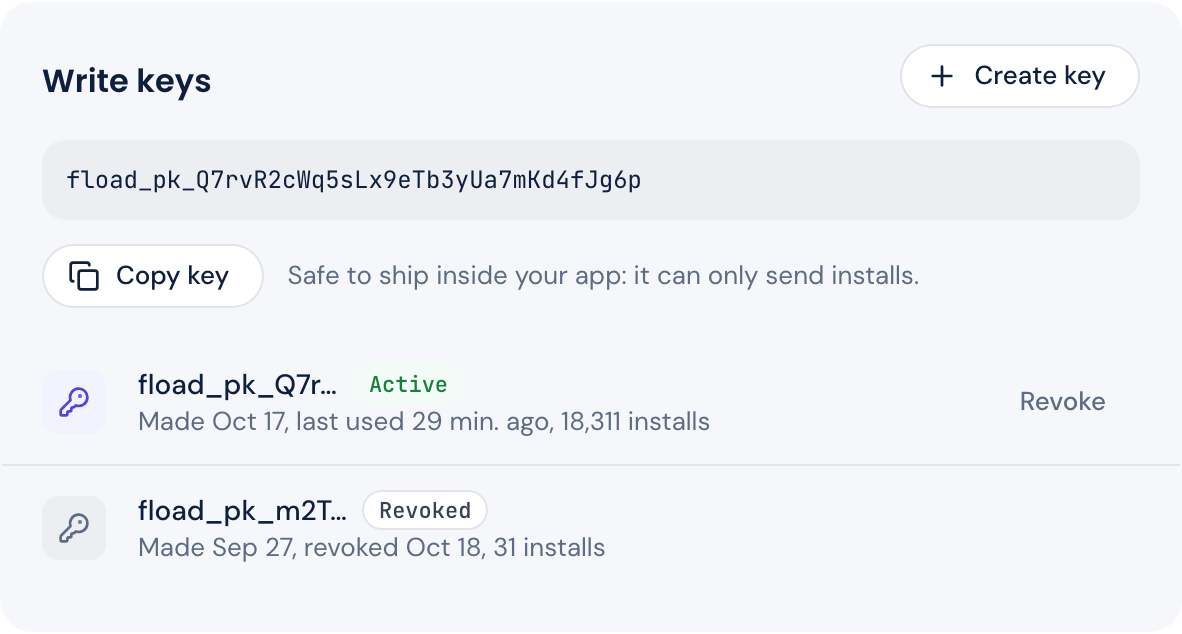
- Under Write keys, press Copy key. It starts with
fload_pk_. The SDK code below it has your key filled in, ready to paste.
Using a coding agent? Under the SDK code, press Copy prompt for your coding agent and paste the prompt into the agent in your app's repository. It finds your app's stack and adds the SDK with your key.
You can also start from the Ads page: the notice Keyword revenue needs install attribution has a Set up button that opens the same panel.
Only an owner or admin can create a key. Any member can see and copy an app's key at any time.
One key covers your app on both iOS and Android, so you use the same key in both builds.
Is it safe to put in my app?
Yes. The key is public by design. It ships inside your app, and anyone who unpacks the app can read it. That's fine:
- It can only send installs for that one app.
- It can't read any data from Fload.
- On iOS, only a token signed by Apple can make an install count as an Apple Ads install. A copied key can't fake Apple's attribution.
Don't put a Fload API key in your app. That's a different, secret key.
See that it works
Each key's row shows when it was made, when it was last used and how many installs it has sent. Before its first install it says not used yet.
Your app's state tells you where it stands:
| State | What it means |
|---|---|
| Not set up | The app has no active key. None was made yet, or every key was revoked |
| Waiting | The app has an active key, and no install has arrived yet |
| Receiving | The app has an active key, and at least one install has arrived |
The state counts every key the app has had. After you rotate, the app stays Receiving before the new key's first install, so check the new key's own row to see it working.
Rotate or revoke a key
An app can have up to 5 active keys, so you can move to a new key without a gap:
- Rotate: create a new key, ship it in an app update, then revoke the old one once few people still use the old version.
- Revoke: the key stops for good. The SDK gets a
410answer and stops sending, so revoke a key only once you've shipped a replacement.
Only an owner or admin can revoke a key.
A revoked key can't be turned back on. Installs on app versions with that key are not counted from then on.